
How I build with Expo and React Native
I am a developer in Leeuwarden and I build apps with Expo and React Native: one codebase for iOS and the web. OnderhoudJe, a digital service book for your car, is built that way. This is how I go about it.
- Expo
- Leeuwarden, NL
- 1 project
What I look after
What building OnderhoudJe taught me to do.
-
One codebase, two platforms
The web app and the iOS app of OnderhoudJe come from the same code. What I build once works on both.
-
An API of its own behind it
A Fastify API with PostgreSQL, so the app and the website use the same data.
-
Start with one field
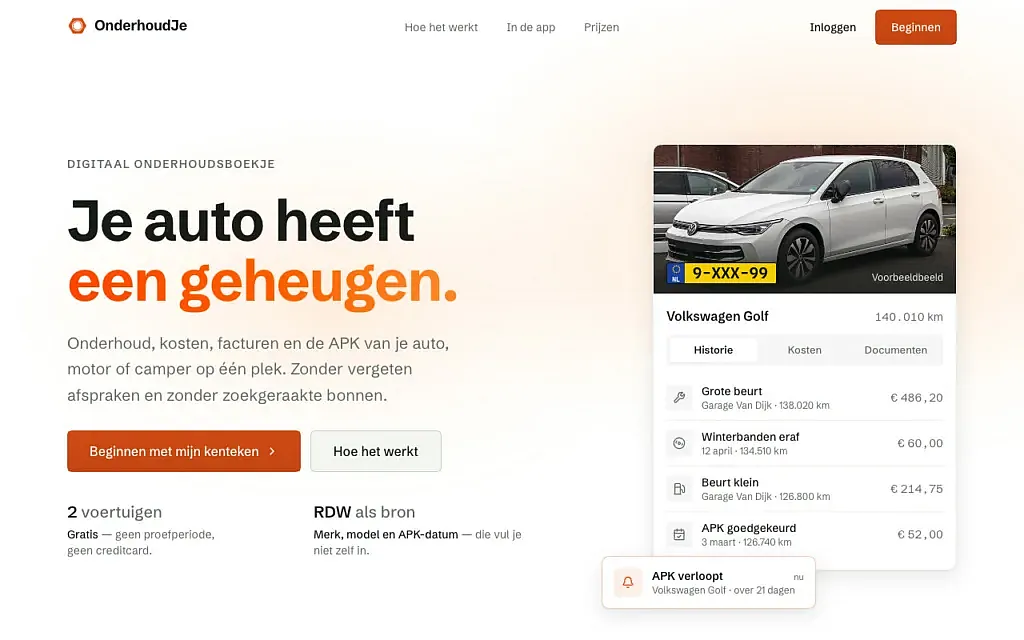
OnderhoudJe starts with the licence plate. Make, model, year and inspection date come from the RDW, so there is nothing to type over.
-
Reminders
Notifications by push or e-mail, by date or by mileage.
-
One language on both sides
TypeScript in the app and in the API: the same language at both ends.
-
Live first, then more
OnderhoudJe is live in alpha as a website and a web app, free for two vehicles. The iOS app is built from the same code.
How is OnderhoudJe put together?
OnderhoudJe is a digital service book for a car, motorbike or camper: maintenance, costs, invoices and the periodic inspection in one place. It started in February 2025 as a study project and is now live in alpha at onderhoudje.nl.
It begins with one field: the licence plate. Make, model, year and inspection date come from the RDW, the Dutch vehicle authority. After that you log per vehicle what happens, a service, new tyres or a repair, with the amount, the mileage and the invoice. Reminders come by push or e-mail, by date or by mileage.
The web app and the iOS app come from one Expo codebase, with React Native and TypeScript. Behind it runs an API in Fastify with a PostgreSQL database, which also feeds the website. Two vehicles are free.
- 1
- 2
- Feb 2025
Built with Expo
A product of my own: website, web app and iOS app.
- React Native
- Next.js
- TypeScript
- Node.js
- PostgreSQL
- Docker
How I work
Clear decisions, short loops and something real to react to.
-
Find the actual need
Before choosing a stack, I clarify the goal, the user and the smallest version worth building.
-
Build the right amount
I choose the simplest stack that fits, then move quickly into something real enough to test and improve.
-
Refine the experience
Responsive behaviour, subtle motion, accessible choices, readable code and a clear CMS turn a working build into a finished product.
Questions
What I often hear about it.
-
With one codebase I build the web app and the iOS app at the same time. For a product I make on my own, that is the difference between maintaining one thing or two.
-
The website and the web app, in alpha. The iOS app is built from the same code.
-
I choose the simplest form that fits. Something you look up now and then is a website. Something you carry with you and that has to remind you, like the maintenance of your car, is an app.
-
An API in Fastify with a PostgreSQL database, and the RDW as the source for the vehicle data.
Which stack when
I choose the simplest one that fits.
| Stack | When |
|---|---|
| WordPress | Content someone manages themselves: a site, a portfolio, a blog. |
| Expo | Something you carry with you and that has to remind you: an app. |
| Next.js | A product with accounts, logic of its own or a lot of interaction. |
| Laravel | An application with users, permissions and a lot of data. |